How to setup my DevContainers using DevPod - Chezmoi and Mise
Published August 21, 2026 · Updated August 24, 2026
View last change
c444ec4 — feat: Added edit date.
Prerequisites:
- Container runtime (like docker)
- IDE (vscode, vim, etc.)
- Project folder with your Devcontainer project files
Install DevPod
First install devpod on your machine.
Install DevPod
curl -L -o devpod "https://github.com/loft-sh/devpod/releases/latest/download/devpod-linux-amd64" \
  && sudo install -c -m 0755 devpod /usr/local/bin && rm -f devpod
This command:
- Downloads the latest devpod binary to a file named
devpod && sudo installextends the curl command withinstallto install the downloaded binary-cis ignored (not sure why it is in here)-maccepts permissions mode as chmoddevpodthe source binary to install/usr/local/binthe install location&& rmextends the install command witrmto remove the downloaded binary-f devpodremoves thefilenameddevpod
Check the installation:
Verify the installation
# use the which command to check if the installation is successful
which devpod

# outputs the location of the binary
/usr/local/bin/devpod
DevPod works with providers. A provider is the runtime where you want to run your pods. This provider is personal to you, and DevPod provides the ability to use the devcontainers on different environments.
Setup DevPod
To setup the DevPod installation for the first time you have to set a provider.
Add and select the docker provider
# add the docker provider
devpod provider add docker

# set the docker provider as default
devpod provider use docker
Adding a provider will add a provider.json file in .devpod/contexts/defaults/providers/docker. A provider is a CLI program that lets DevPod communicate with the specific engine to manage the devcontainers.
Setup the devcontainer files to include mise
Include Mise into our devcontainer setup. This will ensure that all the tools needed for the project are installed when the container is created.
These are specific settings and tools for this project. The configuration files lives within the project folder.
Chezmoi will also install Mise. The difference is that Mise installed by the devcontainer setup will install all the tools specific to this devcontainer. It looks at the
/workspace/project/mise.tomlfile, whereas Chezmoi will install the.config/mise/config.toml
The following files are used in this setup:
- devcontainer/.devcontainer.json
- devcontainer/Dockerfile
- scripts/setup
- mise.toml
.devcontainer.json
{
  "build": {
    "context": "..",
    "dockerfile": "Dockerfile"
  },
  "postCreateCommand": "scripts/setup"
}
What this file does:
buildwithin the build property you tell to use a Dockerfile as content to build the container."context": "..",is the relative path to the .devcontainer.json where the dockerbuild should be run from."dockerfile": "Dockerfile"is the location of the Dockerfile, relative to thedevcontainer.jsonfile."postCreateCommand"runs once the container is created, and this will runscripts/setup.
It is still possible to install extensions or variables through the
.devcontainer.jsonif necessary.
.devcontainer/Dockerfile
FROM mcr.microsoft.com/devcontainers/base:ubuntu-24.04

COPY --from=jdxcode/mise /usr/local/bin/mise /usr/local/bin/

# make sure mise is activated in both zsh and bash. Might be overridden by a user's dotfiles.
RUN echo 'eval "$(mise activate bash)"' >> /home/vscode/.bashrc && \
    echo 'eval "$(mise activate zsh)"' >> /home/vscode/.zshrc
What this file does:
FROMthe image to be loadedCOPYcopies a file, in this case from another container--from=jdxcode/miseand copies the file/usr/local/bin/misefrom this container to/usr/local/bin/into the container.RUN echoto put values into the.bashrcand.zshrcdotfiles
mise.toml
[tools]
bat = "latest"
kubectl = "latest"
vim = "latest"
What this file does:
[tools]tells mise to install the following toolsbat = "latest"tells mise to install bat, with the version latest
scripts/setup
#!/bin/bash

/usr/local/bin/mise trust /workspaces/$DEVPOD_WORKSPACE_ID/mise.toml && /usr/local/bin/mise install
What this script does:
#!/bin/bashset the shell to run with/usr/local/bin/mise trust /workspaces/$DEVPOD_WORKSPACE_ID/mise.tomlruns mise with the trust command to trust the mise.toml file.&& /usr/local/bin/mise installextends the script by running mise install using themise.tomlfile.$DEVPOD_WORKSPACE_IDcontains the name of the project/folder the DevPod up . command is started from.
For example when you run
DevPod up .from a project folder namedtest-codethe Workspace will be calledtest-codeand the variable$DEVPOD_WORKSPACE_IDwill be set totest-code.
Building the project
Run the following command in the directory of the project to start the devcontainer.
Build and start the devcontainer
devpod up . --ide none --dotfiles https://github.com/jackykornet/dotfiles.gitWhat this command does:
devpod up .start the devpod from the current directory (should be in the project folder)--ide nonethe ide to use. Use none for Vim.--dotfiles https://github.com/jackykornet/dotfiles.gitthe dotfiles git repo. This repo will be pulled in to the DevContainer to use.
When you choose another IDE, additional tools will be installed during the build.
When the DevPod starts, the dotfiles are pulled to the container into the ~/dotfiles directory, and it looks for a setup script to run. In my case I have a setup file in the root of my repo. The build process finds this file and executes it.
The setup file needs to be made executable beforehand
chmod +x setup
In the setup file you can link dotfiles or do other stuff, like installing software. I’m going to use Chezmoi to manage the dotfile configuration. For this we have to add the following code to the setup script.
setup
#!/bin/bash

set -euo pipefail

if ! command -v chezmoi >/dev/null; then
    sh -c "$(curl -fsLS get.chezmoi.io)" -- init --apply https://github.com/jackykornet/dotfiles.git
fi

exit 0
What does this command do:
#!/bin/bashrun with bashset -euo pipefailThe return code of any command in a pipeline that fails will be used as the return code of the whole pipeline, not just the last.if ! command -v chezmoi >/dev/nullchecks if chezmoi is installed (echo $? will return 1 if not and the if statement fails)sh -c "$(curl -fsLS get.chezmoi.io)" -- init --applyhttps://github.com/jackykornet/dotfiles.git installs chezmoi, initiates a new repo, pulls my dotfiles repo and applies the changes.exit 0exit 0 if no pipefail exists
See the linked blogpost for the Chezmoi setup.
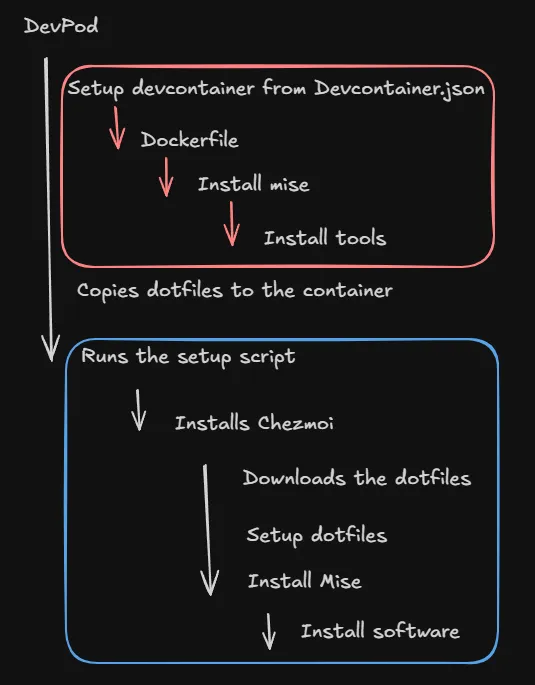
The deployment process
devpod up .starts up the devpod based on theDevcontainer.json- After the container is created it will run the postCreateCommand
- Installs mise into the workspace
- Install tools in
workspace/mise.tomlin to the workspace
- Install tools in
- Installs mise into the workspace
- Copies dotfiles to the container
- Runs the
setupscript- Installs
Chezmoi- Downloads the dotfiles
- Setup dotfiles
- Install Mise
- Install tools into the container image
- Installs
- After the container is created it will run the postCreateCommand
Different tool versions can be available to you based on the folder you are in.
Setting defaults
There are some default settings you can set. This is handy when you’re using the same dotfiles directory and IDE for all your devpods on a specific machine.
Set default options
# Set default URL
devpod context set-options -o DOTFILES_URL=git@github.com:you/dotfiles.git

# Set default IDE
devpod ide use none
Commands used frequently
Frequently used commands
# List workspaces
devpod ls

# SSH into workspace
devpod ssh <workspace-name>

# Delete workspace this forces fresh rebuild the next time you bring the devpod up
devpod delete <workspace-name>

# Stop the workspace
devpod stop <workspace-name>

# use the --recreate parameter to recreate a devpod
devpod up . --ide none --dotfiles https://github.com/jackykornet/dotfiles.git --recreate

##
## Mise
##

# Install new packages with mise
mise install

# List all installed packages
mise list

##
## Chezmoi
##

git add .

# commit changes
git commit -m "message"

# push to repo
git push
For consideration
When installing a package with Mise you can do this with mise install this will add the packages to the mise.toml file automatically. When you add packages to be installed through Chezmoi you have to do this in the dot_config folder of the working directory and then commit and push the changes to git to make the change available after a rebuild.
Links
Questions or thoughts about this post? Reach me at jacky@tenrok.nl or on LinkedIn.